



Structured message content
Build the main message body and add an optional header and footer so each template has a clear, reusable structure.
WhatsApp Business Platform templates
Create reusable WhatsApp message templates for supported business-initiated communication. Build text and media formats with variables and buttons, submit them to Meta, track the available review status, and use approved templates across BotLinkd messaging workflows.
Meta controls template approval, rejection, categorisation, reclassification, quality controls and enforcement. BotLinkd does not guarantee approval.
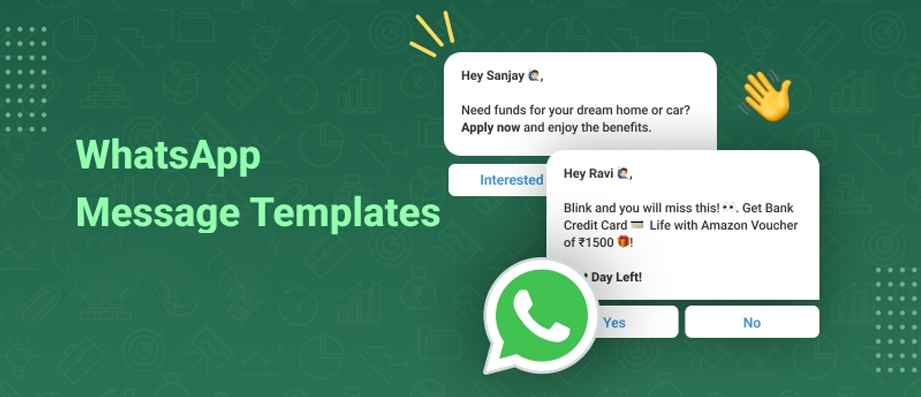
Clear definition
A message template is a reusable WhatsApp Business Account asset with structured content that can be submitted for review and then sent through supported WhatsApp Business Platform workflows after approval.
Approved templates support eligible business-initiated messages, including communication started outside an active 24-hour customer service window. The exact category and content should match the reason for contacting the customer.
Template approval is one part of compliant messaging. Businesses should also maintain a valid basis for contact and respect recipient preferences.
Template builder
Prepare the content and interactive elements required for your use case while keeping review ownership and platform restrictions clear.
Build the main message body and add an optional header and footer so each template has a clear, reusable structure.
Configure supported image, video, document or location components where the selected template format and use case allow them.
Add numbered placeholders such as {{1}}, {{2}} and {{3}}, then provide example values for review.
Add supported quick-reply options that let customers respond using predefined actions connected to the approved template.
Add supported call-to-action buttons for a website destination or phone number when they fit the template purpose.
Use a supported copy-code button for eligible offer-code or authentication configurations when that option is available.
Submission workflow
BotLinkd provides the creation, submission and status-management workflow. Meta remains responsible for review decisions and ongoing platform controls.
Select Marketing, Utility or Authentication according to the message purpose and the current Meta category rules.
Configure the body, supported header or media, variables, examples, footer and buttons required for the use case.
Send the completed template for Meta review through the BotLinkd template-management workflow.
Track the available status and use approved templates in supported campaigns, scheduling and messaging workflows.
Template categories
Correct categorisation matters because Meta can review, reject or reclassify a template based on its content and intended use.
Prepare opted-in communication for offers, product launches, back-in-stock alerts and other promotional or engagement use cases, subject to applicable policies.
Create relevant operational messages such as order updates, appointment reminders, payment reminders and service notifications tied to a customer action or request.
Prepare supported verification-code or one-time-password workflows. Availability and button behaviour can depend on Meta requirements, account eligibility, region and device support.
Common use cases
The correct template structure and category depend on the actual communication purpose, customer context and current Meta requirements.
Confirm an order, share a dispatch update, provide a delivery status or communicate another relevant transaction event.
Send appointment confirmations, upcoming-service reminders or payment reminders connected to an existing customer relationship.
Reach opted-in contacts with an eligible promotion, product launch, availability alert or other marketing message.
Support eligible authentication journeys using the approved format and the authentication options available to the account.
Clear responsibility
This distinction helps teams plan accurately and avoids treating a submission workflow as an approval or delivery guarantee.
Important: An approved template must still be used for the purpose represented by its category, with appropriate customer consent and accurate variable values. Approval does not override WhatsApp policies or applicable law.
In BotLinkd Campaign Manager, teams can select an approved template, map body variables, configure supported buttons, save a draft, set a schedule or send a campaign. Campaign logs can show Sent, Delivered, Read and Failed events where available.
Template-specific FAQs
A WhatsApp message template is a reusable WhatsApp Business Account asset with approved content and components. Businesses use approved templates for supported business-initiated communication, including messages sent outside an active 24-hour customer service window.
Depending on the selected format, you can configure a message body, optional header and footer, supported image, video, document or location components, numbered variables with examples, and eligible quick-reply, website, phone or copy-code buttons.
The primary categories are Marketing, Utility and Authentication. The selected category should match the message purpose, and Meta may reject or reclassify a template when the submitted content does not match the selected category.
Meta controls the template review decision. BotLinkd provides the workflow to create and submit the template and to display the available status returned for that template.
No. Approval, rejection, categorisation, reclassification, quality controls and policy enforcement are controlled by Meta. Businesses should submit accurate content that matches the selected category and applicable policies.
Variables use numbered placeholders such as {{1}}, {{2}} and {{3}}. Example values show the type of information that will replace each placeholder, such as a customer name, order reference, appointment time or verification code.
Yes. In supported campaign flows, teams can select an approved template, map its body variables, configure supported buttons, save a draft, schedule the campaign or send it.
Yes. Approval does not remove ongoing Meta controls. Meta may apply quality, policy, category, account or template-level restrictions based on current platform rules and message performance signals.
Prepare the right format for your customer journey, submit it to Meta, monitor the available status and use approved templates across supported BotLinkd messaging workflows.
BotLinkd is an independent business messaging platform built on the official WhatsApp Business Platform Cloud API. BotLinkd is not owned or operated by Meta. Meta and WhatsApp control their platform policies, template decisions and account-level enforcement.