



Visual Flow DesignConnect customer journeys without coding the core flow
Drag-and-drop WhatsApp automation for business teams
Build No-Code WhatsApp Chatbots in Minutes
Design guided WhatsApp conversations with a visual flow builder. Automate FAQs, qualify leads, present products, collect customer details, connect verified business data and transfer the conversation to a human agent when needed.
No-code visual builder
Official Cloud API
Human handover
BotLinkd is an independent business messaging platform built on the official WhatsApp Business Platform Cloud API. It is not owned or operated by Meta.
Official Cloud APIBuilt for the WhatsApp Business Platform
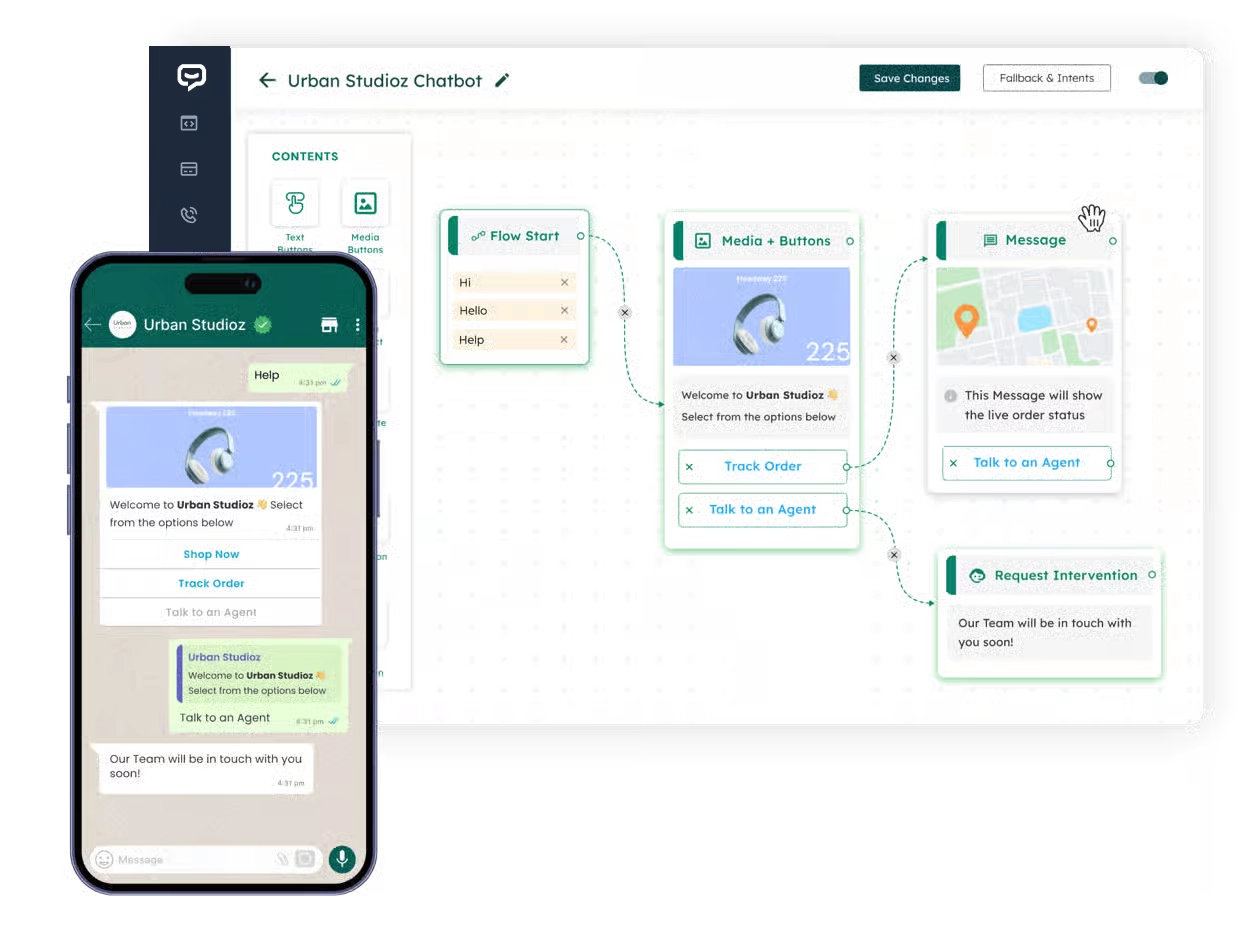
Conditions & RoutingDirect each customer to the correct next step
Human InterventionMove sensitive conversations to an agent
Why build smart WhatsApp chatbots with BotLinkd
Respond faster, qualify enquiries and keep human agents focused on the conversations that need them
Slow replies can cost leads and create unnecessary support work. BotLinkd helps business teams build repeatable WhatsApp journeys while preserving a clear path to a person.
Automate repetitive support
Answer common questions, collect the details your team needs and route exceptions to a human agent without making customers repeat the conversation.
Qualify leads consistently
Ask structured questions, identify intent and send qualified enquiries to the correct sales queue or connected workflow.
Stay responsive 24/7
Provide an immediate first response, share approved information and capture context even when your human team is unavailable.
Turn leads into customers
Guide each enquiry toward a clear next action
Use questions, buttons, lists, conditions and product steps to understand what the customer needs. The flow can route qualified enquiries to sales, present a relevant offer or connect the conversation to an approved checkout process.
- Collect customer requirements consistently
- Segment leads according to their answers
- Preserve human review for exceptions and high-value opportunities
A chatbot builder for non-technical teams
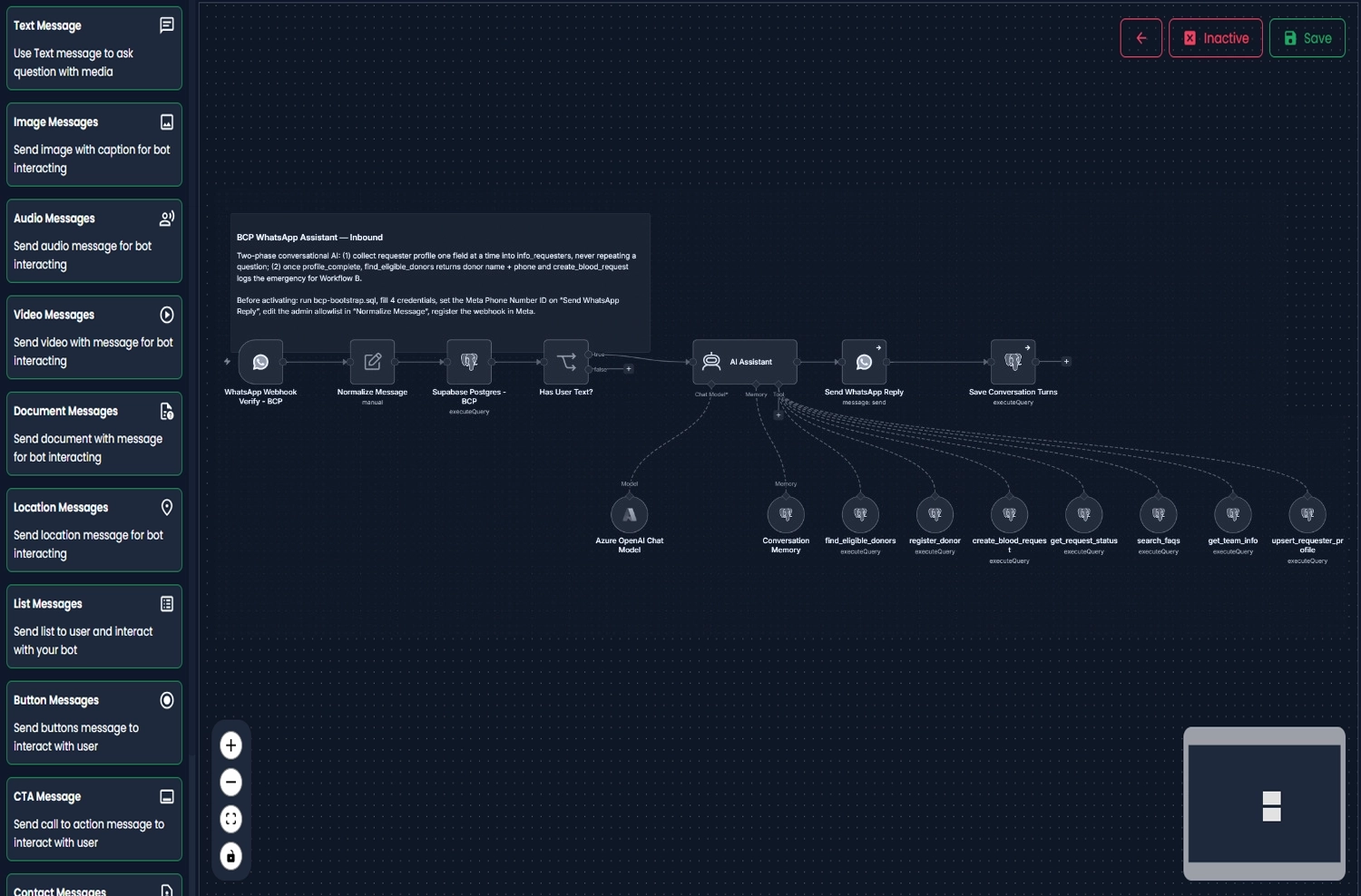
Build the core customer journey with drag-and-drop blocks
Arrange flow-start rules, messages, media, buttons, product choices, conditions and human-intervention steps on one visual canvas. Your team can review the conversation logic before it reaches customers.
Advanced integrations may require API credentials or technical configuration, but the customer-facing conversation can still be designed visually.
See how the builder works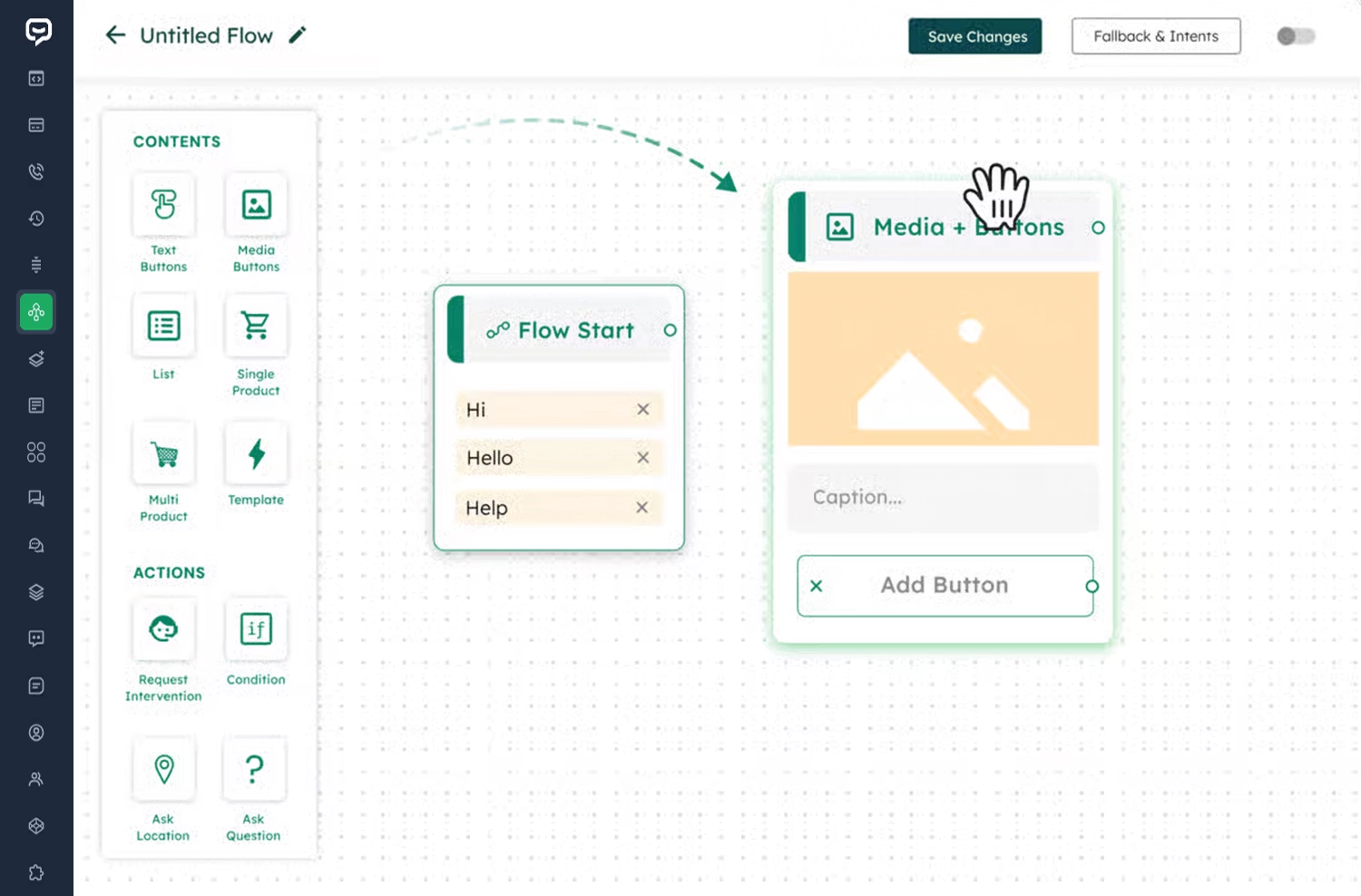
Reusable conversation building blocks
Create guided journeys with messages, choices, conditions and connected actions
Combine the blocks required for your workflow and test every route before enabling it for live customers.
Text messages
Send instructions, confirmations, questions and dynamic replies.
Images and media
Add images, audio, video and documents where supported.
Lists and buttons
Give customers clear options instead of relying on free-text replies.
Product messages
Present supported catalogue items and product choices in a guided flow.
Conditions
Branch the conversation according to answers, status or verified data.
Location requests
Request or share location details when the workflow requires them.
Human intervention
Transfer the conversation to an authorised agent with context intact.
API and webhook steps
Connect approved business systems for verified data and actions.
Support and sales automation on WhatsApp
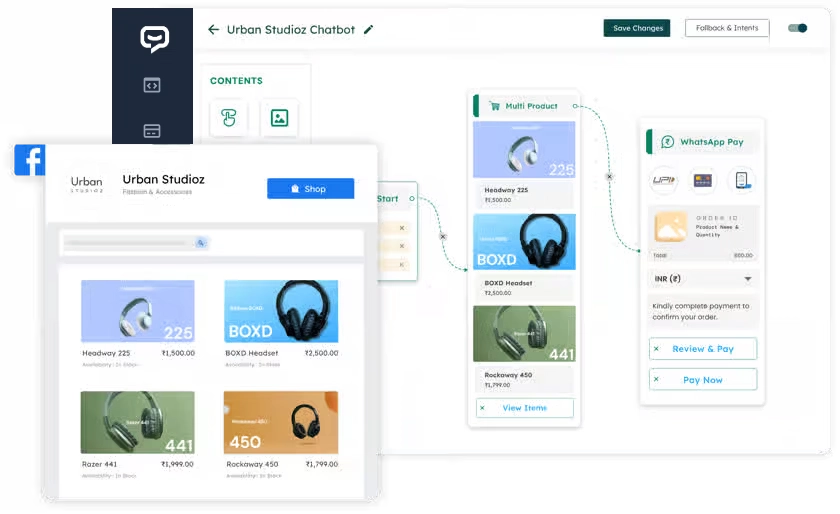
Connect product discovery, order review and payment guidance
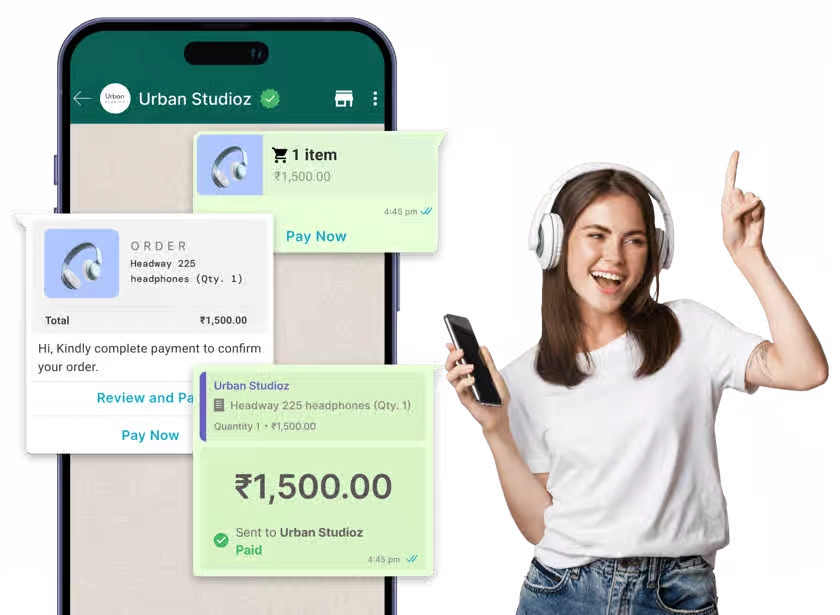
A commerce flow can help customers select a product, review an order and move to a supported payment or checkout step. The exact journey depends on your catalogue, region, payment provider and connected business systems.
Product and catalogue guidance
Order detail collection
Payment-link or checkout routing
Agent escalation for exceptions
Connect BotLinkd with business tools
Use APIs and webhooks when the flow needs verified external data
Connect approved CRM, database, order, booking or automation systems through supported APIs and webhooks. The workflow can use verified results while keeping authentication, permissions, logging and fallback behaviour under control.
How it works
Create your first BotLinkd WhatsApp chatbot in five practical stages
Start with one focused customer journey. Test every condition, fallback and handover before expanding the flow.
-
01
Unlock the Flow Builder
Create your BotLinkd account and activate a plan or add-on that includes WhatsApp chatbot flows.
-
02
Create a new flow
Open the Flow Builder, create a flow and give it a clear name based on the customer journey it will manage.
-
03
Design the conversation
Drag message, media, list, product, question, condition and intervention blocks onto the canvas and connect them visually.
-
04
Set triggers and conditions
Define the entry point, keywords, button responses, template journeys or connected events that should start each path.
-
05
Test, save and enable
Test every branch, fallback and human handover, then save and enable the flow when it is ready for live conversations.
Yes, the core flow is visual.
Open BotLinkd, create a flow, connect the blocks, test it and enable it when ready.
Unlock Flow Builder
WhatsApp chatbot use cases
Apply guided automation to support, sales, commerce and service workflows
Each use case should have a defined objective, verified information, fallback handling and a route to an authorised person.
E-commerce
Show supported products, capture buying intent, collect order details and guide customers to payment or checkout workflows.
Customer support
Answer FAQs, collect troubleshooting details, check connected status information and escalate to a live agent.
Lead qualification
Collect requirements, segment enquiries and route qualified leads to the appropriate team or CRM stage.
Click-to-WhatsApp ads
Start a guided conversation when a prospect opens WhatsApp from an advertisement and continue with the relevant flow.
Appointment booking
Collect service, date and contact preferences and connect the customer to an approved booking or confirmation process.
Order tracking and updates
Use verified order data to provide status updates, payment reminders and the correct next action for the customer.
Extend selected flows with AI assistance
Combine structured automation with business knowledge, conversation memory and human control
Use deterministic flow blocks for required steps and add AI assistance where natural-language understanding is useful. AI responses should be grounded in approved information, tested before production and escalated when the answer is uncertain.
Everything you need for WhatsApp engagement
Manage automation, human conversations and connected workflows in one platform
BotLinkd brings official WhatsApp Cloud API messaging, automation and team operations together around the customer conversation.
Multi-agent shared inbox
Let authorised team members manage customer conversations from the same WhatsApp number.
Learn MoreChatbot Flow Builder
Build and maintain multiple guided WhatsApp conversation flows without coding the core journey.
Learn MoreAudience retargeting
Segment opted-in contacts and run relevant follow-up campaigns within your approved messaging strategy.
Learn MoreScheduled messaging
Plan supported broadcasts and follow-ups for the appropriate date, time and audience.
Learn MoreImport, broadcast and track
Manage opted-in contacts, send approved messages and review available campaign and delivery activity.
Learn MoreAds that click to WhatsApp
Connect advertising journeys to a relevant WhatsApp entry point and guided conversation.
Learn MoreWeb and system integrations
Connect supported CRM, e-commerce, webhook and API workflows when verified external data is required.
Learn MoreStructured data collection
Collect customer answers through guided questions, buttons, lists and supported form-style journeys.
Learn MoreResponsible WhatsApp automation
Automation still requires consent, accurate information and human oversight
Your business remains responsible for recipient consent, Meta policy compliance, message-template use, connected-system security, data accuracy, monitoring and appropriate human escalation. Test every live flow after changes to its content or integrations.
Frequently asked questions
WhatsApp chatbot Flow Builder FAQs
Clear answers about no-code design, human handover, integrations, products, order data, AI and the official Cloud API.
What is a WhatsApp chatbot and how does it work?
A WhatsApp chatbot is a business messaging workflow that responds to customers automatically. It can answer approved questions, guide users through options, collect information, qualify leads, support orders and transfer a conversation to a human agent. BotLinkd lets you design these journeys visually with connected blocks and conditions.
Do I need coding skills to create a BotLinkd WhatsApp chatbot?
No coding is required to design the core conversation flow. You can arrange messages, media, buttons, lists, questions, conditions and handover steps through the visual builder. Advanced API, webhook or custom business-system integrations may still require technical configuration.
Can a human agent take over the conversation?
Yes. A flow can route the customer to an authorised human agent when the request requires judgement, account access, an exception or personal assistance. The available conversation history can remain visible to the agent in the shared inbox.
Can I connect the chatbot with my CRM, website or e-commerce system?
Supported APIs, webhooks and integrations can connect the flow with approved CRM, website, order or e-commerce data. Access should be limited to the information and actions needed for the workflow, with proper authentication and fallback handling.
Can the chatbot show products and support payment journeys?
A configured flow can present supported product or catalogue information and guide customers to an approved payment link or connected checkout process. Availability depends on your WhatsApp account, region, catalogue setup, payment provider and current BotLinkd configuration.
Can BotLinkd provide order tracking or account status?
Yes, when verified information is supplied through an approved integration. The flow should not invent order or account data; it should use the connected source, ask for clarification or transfer the conversation when reliable information is unavailable.
Does the Flow Builder use the official WhatsApp Business Platform?
BotLinkd’s current WhatsApp module is built for the official WhatsApp Business Platform Cloud API. Your business must follow Meta policies, template rules, recipient-consent requirements and the applicable messaging limits.
Can I build more than one chatbot flow?
You can create multiple flows subject to the limits of your selected BotLinkd plan. Different flows can be used for support, sales, lead qualification, product guidance, order updates and other approved customer journeys.
Can AI be added to a chatbot flow?
AI assistance can be combined with approved business knowledge, conversation memory, APIs and human handover in supported configurations. AI output should be tested, monitored and restricted with clear fallback and escalation rules.
Ready to build your first flow?
Create a guided WhatsApp journey your team can test and supervise
Start with one support, lead or sales workflow, connect the required blocks and enable it after the conversation logic and human handover have been reviewed.