



Official Cloud APISupported WhatsApp operating model
Structured customer choices inside WhatsApp
WhatsApp Interactive Messages, Buttons & Lists
Guide customers with supported quick replies, website and phone actions, copy-code buttons and list menus through BotLinkd and the official WhatsApp Business Platform Cloud API.
Quick replies
Action buttons
List menus
BotLinkd is an independent business messaging platform and Verified Meta Tech Provider. It is not owned or operated by Meta.
BotLinkd Assistant
Automation with human handover
Today
Automation + AIWith controlled human handover
APIs and webhooksConnect external business workflows
Policy-aware setupSubject to current Meta requirements
What interactive messaging changes
Turn an open-ended chat into a clear next step
An ordinary text message asks the customer to interpret the request and type a response. An interactive message can present supported choices or actions inside the WhatsApp conversation, helping the customer understand what can happen next.
BotLinkd can connect that structured selection to automation, an AI-assisted conversation, a shared team inbox, an API workflow or an authorised human agent. The message remains part of a broader business messaging operation rather than a standalone chatbot feature.
Clear customer choices
Structured reply handling
Automation with fallback paths
Human agent escalation
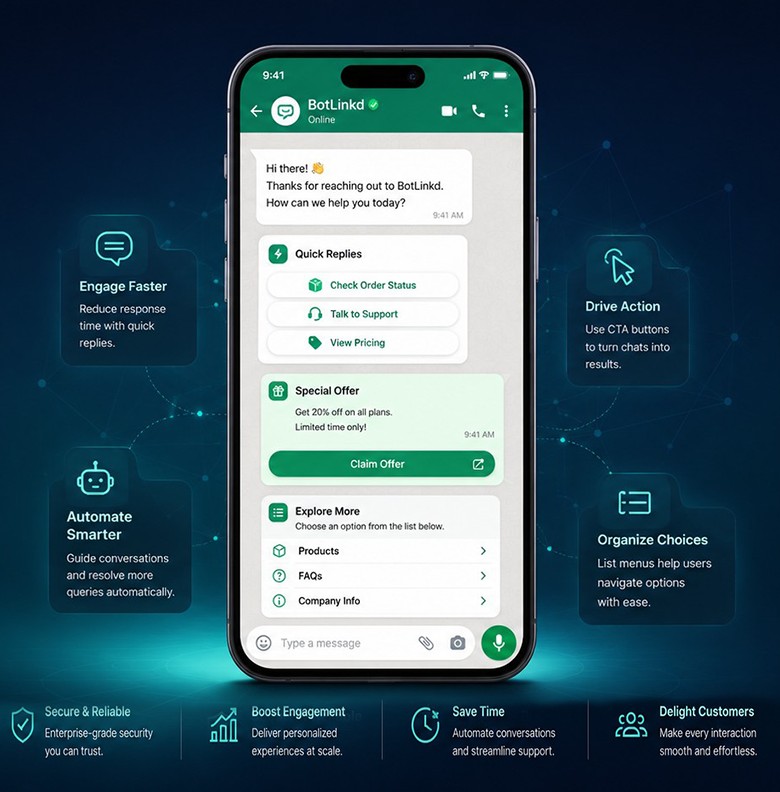
Supported interaction patterns
Choose the component that matches the customer decision
Button and list availability depends on the selected WhatsApp message or approved template. BotLinkd should use only the component combinations supported by the current format.
Guided choices
Quick reply buttons
Present a short set of predefined responses so customers can confirm, decline, reschedule or choose the next step without typing a free-form answer.
- Useful for confirmations, qualification and support routing
- Returns a structured selection that automation can process
- Can hand the conversation to an authorised human agent
Direct actions
Call-to-action buttons
Attach supported actions such as opening a website, calling a phone number or copying an offer code when the selected WhatsApp message or approved template supports them.
- Link to checkout, invoice, booking or account pages
- Offer a direct phone action for sales or support
- Keep the next business action visible inside the message
Organised menus
Interactive list messages
Group several supported options into a compact menu for departments, services, product categories, appointment choices or frequently requested help topics.
- Keeps longer choice sets readable inside the conversation
- Supports structured navigation through automated flows
- Reduces clutter compared with sending every option as text
Three practical message patterns
Design the interaction around one clear objective
Each message should make the expected response obvious and include a fallback when the customer needs something outside the predefined choices.
01
Quick reply example
Confirm an order without requiring a typed command
Present short, distinct choices and route each supported response to the correct order action. Keep a support option available when the customer’s situation does not match the automated path.
Explore the WooCommerce integration
02
Call-to-action example
Move from a billing reminder to the correct destination
A supported call-to-action button can open an invoice, checkout, booking or account page, or offer a direct phone action. The destination should be secure, mobile-friendly and clearly related to the message.
Explore the WHMCS integration
03
List message example
Organise several service options without filling the chat
Use a supported list when the customer needs to choose from more categories than a short reply-button set can comfortably display. Keep section and row names concise so the menu remains easy to scan.
View BotLinkd integration optionsImplementation workflow
Build the response path before sending the message
The button is only the visible control. A reliable workflow also defines what each selection does, what happens when it fails and when a person takes over.
-
01
Define the customer decision
Choose the exact response or action the customer should take, such as confirming an order, selecting a department or opening an invoice.
-
02
Choose the correct message context
Decide whether the interaction belongs in an active customer-service conversation or in an approved WhatsApp message template.
-
03
Configure labels and actions
Write clear button labels, connect supported URLs or phone actions and map each customer selection to the intended workflow.
-
04
Connect automation and agents
Use rules, AI assistance, APIs or webhooks to process the response while preserving human handover when a person should take control.
-
05
Test before production use
Verify the rendered message, button destination, reply routing, fallback path and current WhatsApp policy requirements before sending to customers.
Connected to the wider BotLinkd platform
Process every selection with automation, APIs or a human team
BotLinkd is not limited to displaying buttons. It supports two-way customer chat, contacts, templates, campaigns, scheduled messaging, automation, delivery tracking, analytics, API keys, webhooks, integrations and optional AI assistance.
Customer actionButton or list selection
BotLinkd routingRule, AI, API or webhook
Automated pathContinue the workflow
Human pathAgent takes control
Business applications
Use interactive messages where a structured decision is genuinely useful
The best component depends on the customer’s task, the message context and the action your business can complete after the selection.
Order confirmation
Let customers confirm, cancel or request a change through clear predefined choices connected to the order workflow.
Support routing
Offer departments or issue categories so the conversation reaches the correct automation, queue or human agent.
Appointments
Use supported buttons or lists for confirmation, rescheduling prompts, service selection or available time choices.
Invoices and payments
Provide a direct supported action to open an invoice, payment page or billing support channel from the message.
Product discovery
Guide customers through departments, categories or next-step options without forcing them to type an exact command.
Lead qualification
Ask structured questions about interest, location, budget or preferred contact path before assigning the lead.
Message context and policy
Interactive design does not replace consent or template requirements
The business remains responsible for lawful recipient permission, the correct WhatsApp message context, an approved template where required, accurate button destinations and honouring opt-out requests. Component availability and limits are controlled by the WhatsApp Business Platform and can change.
Interactive message questions
WhatsApp buttons and list message FAQs
Practical answers about message types, approval context, automation, integrations, tracking and safe fallback behaviour.
What is an interactive WhatsApp message?
An interactive WhatsApp message presents supported response or action components inside the conversation, such as quick reply buttons, call-to-action buttons or a list menu. The available component depends on the message type, conversation context and current WhatsApp Business Platform support.
Which interactive message types can BotLinkd support?
BotLinkd can work with supported quick reply buttons, website or phone call-to-action buttons, copy-offer-code actions where available, and interactive list messages. Exact availability depends on the selected message or template type, connected account and current Meta support.
Do interactive WhatsApp messages require template approval?
Not every interactive message uses the same approval path. Supported interactive messages may be used during an active customer-service conversation. A business-initiated message or a message sent outside the permitted service conversation generally needs an approved WhatsApp message template with supported components. Current Meta policy and account conditions apply.
How many buttons or list options can I add?
Limits vary by message type and can change as the WhatsApp Business Platform evolves. BotLinkd should only present combinations supported by the selected message or approved template. Check the current component rules before publishing a production workflow.
Can quick reply and call-to-action buttons be mixed?
The permitted combination depends on the selected WhatsApp message or template format. Some formats restrict button categories or quantities. Use the components supported by the specific format rather than assuming every button type can be combined.
Can an AI chatbot use button responses?
Yes. A supported button or list selection can be used as structured input for an automated flow or AI-assisted conversation. BotLinkd also supports human handover, per-contact AI pause and platform-wide AI pause when an authorised agent should take control.
Can BotLinkd connect interactive messages to my website or CRM?
Yes. Depending on the workflow, supported button selections and message events can be connected to websites, CRMs, e-commerce systems or internal tools through BotLinkd APIs, webhooks and available integrations.
Can I track button clicks and customer selections?
BotLinkd can process supported reply selections and available message events. A website-button click may require tagged URLs or analytics on the destination website, and not every action produces the same platform event. Delivery, clicks and conversions are not guaranteed.
What happens when a customer types a different response?
The workflow should include a safe fallback for free-form text, unsupported input or an expired interaction. BotLinkd can route the message to another automation step, AI assistance or an authorised human agent according to the configured rules.
Do interactive messages guarantee higher conversions?
No. Clear choices can reduce friction in suitable workflows, but BotLinkd does not guarantee replies, clicks, sales or conversion. Results depend on the audience, message purpose, consent, content, timing, destination experience and customer behaviour.
Plan the response path first
Build clearer WhatsApp customer journeys with BotLinkd
Create an account or speak with the BotLinkd team about supported buttons, list menus, templates, automation, human handover and integrations for your business workflow.