



Website contentSelected service and help pages
Approved
Business-specific knowledge for AI-assisted WhatsApp conversations
Custom AI Training on Your Business Data
Configure your BotLinkd AI assistant with approved website content, FAQs, policies, product information and supported documents—then define tone, boundaries, fallback behaviour and human escalation rules.
Approved data sources
Guardrails and testing
Human escalation
BotLinkd is an independent business messaging platform built on the official WhatsApp Business Platform Cloud API. It is not owned or operated by Meta.
BotLinkd Knowledge Workspace
Sources, instructions and testing
Returns-policy.pdfReviewed customer policy
Approved
Support FAQsStructured questions and answers
Approved
Knowledge configuration
Ready for testing
Test result
Answer matched approved policy
Selected SourcesUse approved business information
Clear InstructionsDefine tone, scope and fallback rules
Practical TestingReview common questions and edge cases
Human ControlHandover and AI pause options
What custom AI training means
Turn maintained business knowledge into a controlled customer-assistance workflow
A general AI model may understand language, but it does not automatically know which version of your policy is current, which services you provide or which requests require human approval. Custom configuration gives the assistant a defined knowledge scope and operating instructions for your business.
In BotLinkd, this knowledge works with the intelligent WhatsApp AI chatbot, conversation memory, automation, multi-agent shared inbox and human controls. The objective is not to remove people; it is to give the assistant reliable reference material and a safe path to a person when it should not continue.
Approved source content
Business-specific terminology
Defined response boundaries
Human review and escalation
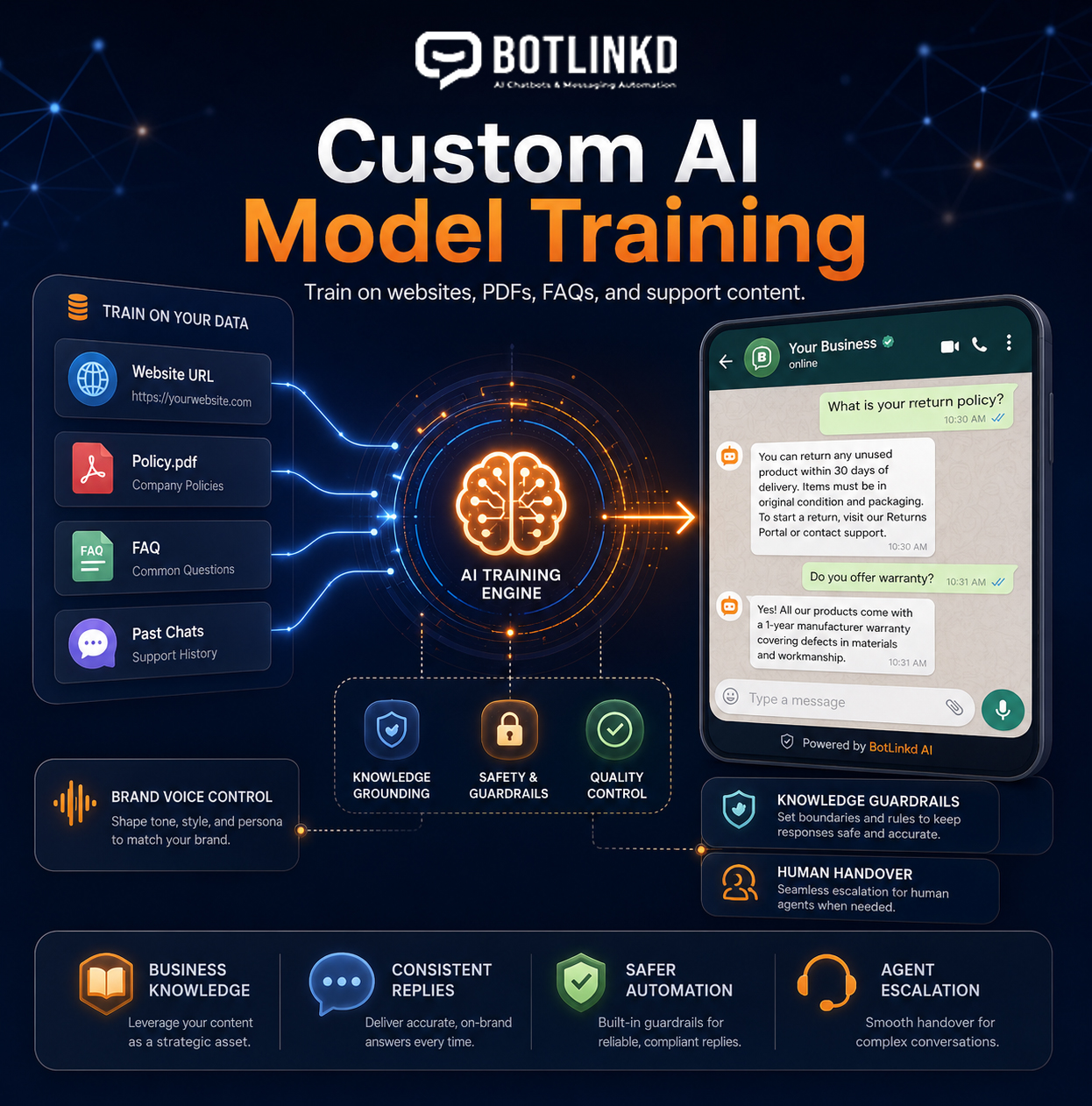
Three parts of a reliable knowledge workflow
Source quality, instructions and testing matter more than impressive-sounding accuracy claims
AI output depends on the information provided, the model, the instructions and the conversation context. BotLinkd helps you organise these elements and preserve a human path for uncertain or sensitive requests.
Approved knowledge sources
Build from information your business controls
Use selected website pages, frequently asked questions, policies, product information and supported documents as reference material for the configured AI assistant.
- Choose the sources the assistant is allowed to use
- Exclude outdated, private or unsupported information
- Keep ownership of source review and approval with your team
Instructions and boundaries
Define tone, scope and escalation rules
Set clear operating instructions for how the assistant should respond, which subjects it may cover and when it must stop and route the conversation to an authorised person.
- Configure brand tone and response style
- Add fallback wording for missing or uncertain information
- Require human handling for sensitive or restricted requests
Testing and maintenance
Evaluate answers before expanding usage
Test common questions, ambiguous wording and difficult edge cases against the approved sources. Review outcomes whenever business information, policies or connected workflows change.
- Compare answers with the source material
- Identify gaps, conflicts and unsafe response patterns
- Maintain a repeatable review and update process
Knowledge sources
Use information that is current, authorised and suitable for customer-facing answers
More data is not automatically better. A smaller collection of accurate, well-structured and regularly maintained sources is usually more useful than a large collection containing conflicting or obsolete information.
Discuss supported data sourcesWebsite content
Selected service pages, product information, help content and public policies that are accurate and suitable for customer-facing answers.
Supported documents
Approved manuals, policy documents, guides and other supported files prepared for reliable extraction and review.
FAQs and structured Q&A
Curated questions and answers that define the preferred response for recurring customer requests and important exceptions.
Organised business information
Maintained service details, product attributes, operating rules or other structured content provided through a supported workflow.
A controlled implementation process
Prepare, configure, test and maintain the assistant in five practical stages
Begin with one well-defined workflow. Expand only after the source content, fallback behaviour and human escalation have been evaluated with realistic questions.
-
01
Define the permitted use cases
Identify the questions the assistant should handle, the information it may use and the situations that must always be transferred to a human agent.
-
02
Prepare and approve source content
Remove obsolete material, resolve conflicting statements and separate public business knowledge from information that should not be exposed to customers.
-
03
Configure knowledge and instructions
Add the supported sources, define response behaviour, set brand tone and create clear fallback and escalation instructions for uncertain requests.
-
04
Test realistic customer questions
Evaluate routine questions, paraphrases, incomplete messages, unsupported requests and edge cases before allowing the workflow to handle live conversations.
-
05
Publish, monitor and maintain
Start with a controlled scope, review conversation outcomes and update the knowledge whenever services, prices, policies or operating procedures change.
Brand voice and operational control
Define how the assistant should speak—and when it should stop
Instructions can guide tone, terminology, response length, allowed topics and escalation behaviour. They are controls, not guarantees, so important workflows should be tested and monitored after deployment.
Preferred tone and terminology
Restricted topics and actions
Clarification and fallback wording
Human handover conditions
Assistant instructionsExample configuration
ToneHelpful and professional
Use approved knowledge onlyConfigured
Escalate uncertain requestsHuman agent
Part of the BotLinkd messaging platform
Connect business knowledge with AI conversations, automation and human agents
Custom knowledge is most useful when it is connected to a managed customer conversation. BotLinkd combines AI assistance with the official WhatsApp Cloud API, conversation memory, a multi-agent shared inbox, per-contact AI pause, platform-wide AI pause, APIs, webhooks and supported integrations.
Approved knowledge
Business Source Layer
One controlled workflow for knowledge, automation and human support
Practical applications
Apply business knowledge to focused customer-support and sales workflows
Each use case should have approved sources, a clear response scope and a human path for requests involving uncertainty, account access, exceptions or judgement.
Policy and service questions
Answer recurring questions about approved service details, eligibility, delivery, returns, availability or operating procedures.
Product guidance
Explain maintained product information and help customers identify suitable next steps without inventing unavailable specifications.
Troubleshooting assistance
Guide customers through approved diagnostic steps and transfer the conversation when account access or specialist judgement is required.
Lead qualification
Collect relevant requirements, clarify intent and route qualified enquiries to the correct sales or service team.
Internal terminology
Help the assistant understand your service names, department labels and approved business terminology for clearer customer conversations.
Support triage
Gather useful context, classify the request and provide the assigned human agent with a more complete conversation history.
Accuracy, privacy and responsibility
Custom knowledge improves relevance; it does not create a guarantee of perfect answers
The business remains responsible for source accuracy, lawful data use, permissions, customer privacy, connected-system security, monitoring and human escalation. Generative AI can produce incomplete or incorrect responses, so high-impact, sensitive or uncertain requests should be handled by authorised people.
Custom AI knowledge questions
Custom AI training FAQs
Page-specific answers about business knowledge, source preparation, documents, testing, brand voice, updates, answer accuracy and BotLinkd human controls.
What does custom AI training mean in BotLinkd?
Custom AI training in BotLinkd means configuring an AI-assisted WhatsApp workflow around approved business knowledge, instructions, tone, boundaries, integrations and escalation rules. The exact technical method can vary by model and configuration; it does not imply that every project creates a new foundation model from scratch.
What information can be used as AI knowledge?
Suitable sources can include selected website pages, FAQs, service descriptions, product information, policies and supported documents. Sources should be accurate, current, lawful to use and appropriate for customer-facing responses.
Can I upload PDFs or other documents?
Supported documents can be included when their text is readable and the content is suitable for the intended workflow. Document support, extraction quality and size limits can depend on the account configuration and current platform capabilities.
Can BotLinkd learn from previous customer conversations?
Approved conversation examples may be useful for understanding common questions or preferred wording, but customer data must be handled lawfully and with appropriate privacy, access and retention controls. Raw historical conversations should not be treated as automatically safe or accurate training material.
Does custom training eliminate incorrect AI answers?
No. Better sources, clearer instructions and testing can reduce avoidable errors, but no generative AI system can guarantee that every answer will be complete or correct. Sensitive, uncertain or high-impact requests should be escalated to an authorised human agent.
How long does the configuration process take?
The timeline depends on the amount, quality and complexity of the source material, the number of workflows, required integrations and the testing scope. A focused FAQ workflow is typically simpler than a multi-department assistant with connected systems and complex permissions.
Can I control the chatbot tone and brand voice?
Yes. You can define response style, preferred terminology, formality, language and other behaviour through configured instructions. Results should still be tested because tone can vary with the underlying model, source content and customer message.
What happens when the AI does not know the answer?
The workflow should use a clear fallback such as asking a clarifying question, stating that the information is unavailable or transferring the conversation to a human agent. The assistant should not invent an answer when approved information is missing.
How are knowledge updates handled?
Your team should review and update the approved sources whenever services, prices, policies or procedures change. Updated content should be tested before it is relied on in customer conversations, especially when old and new information could conflict.
Can the trained assistant work with the BotLinkd shared inbox?
Yes. The configured AI assistant can operate alongside BotLinkd conversation memory, multi-agent shared inbox, human handover, per-contact AI pause and platform-wide AI pause controls, subject to the selected account configuration.
Start with a focused knowledge scope
Configure an AI assistant around information your team can maintain
Create a BotLinkd account or discuss your source content, response boundaries, testing plan, human handover and connected WhatsApp workflow with the team.