




Lead Submitted
A customer becomes a genuine lead for your business.
Connect real WhatsApp leads and completed purchases to your Facebook and Instagram Click-to-WhatsApp ads. BotLinkd lets an authorized person report outcomes manually from eligible conversations, helping Meta understand what happens after a customer starts chatting.
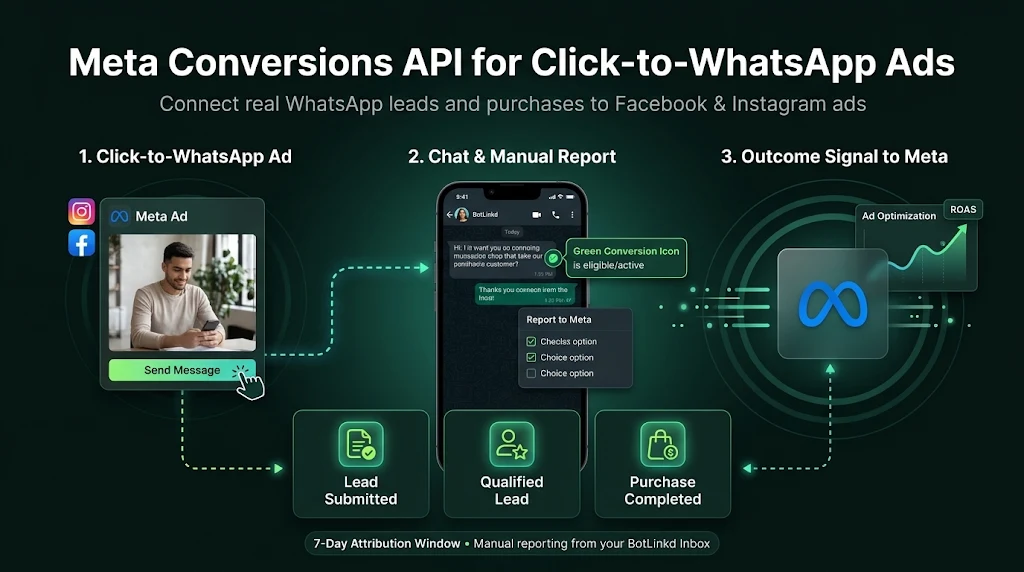
Report confirmed business outcomes rather than treating every incoming ad conversation as a sale.
A customer becomes a genuine lead for your business.
A lead meets your business qualification criteria.
A real sale, with amount, currency and unique order reference.
Start from your existing connected WhatsApp number. The feature is off by default and each number has its own settings.
As the Account Owner, find the connected WhatsApp number and open its Meta Conversions API settings.
Turn the feature on, use Automatic Setup or authorized Manual Setup, then verify Dataset access. Each number is OFF by default.
Use the green conversion icon for chats with qualifying Click-to-WhatsApp attribution within the supported seven-day window.
Choose Lead Submitted, Qualified Lead or Purchase Completed, enter any required details and manually confirm Report to Meta.
Conversions can only be reported for customers who messaged from a Click-to-WhatsApp ad within the last 7 days, where valid attribution is available.
The chat has eligible Click-to-WhatsApp attribution for reporting an actual business outcome.
No valid eligible attribution was found. Select the icon to view the reason. Organic conversations cannot be reported using this feature.
Meta authorization and actual delivery are separate checks. A connected or verified Dataset confirms setup, but does not by itself confirm that any conversion event was successfully delivered. Reporting requires an authorized user, a genuine outcome and an eligible chat. This seven-day attribution rule is separate from WhatsApp's 24-hour free-form messaging window.
Key eligibility, configuration and reporting rules.
Meta Conversions API lets authorized businesses manually report genuine lead and purchase outcomes from eligible Click-to-WhatsApp ad chats to Meta. BotLinkd does not automatically report conversions.
Growth, Pro, Scale, Business and Elite include Meta Conversions API without a separate BotLinkd feature add-on. Meta advertising charges remain separate.
BotLinkd provides per-number setup for official WhatsApp Cloud API and eligible WhatsApp Business App Coexistence connections. Valid Meta authorization, Dataset access and ad attribution are required.
A grey icon means no eligible Click-to-WhatsApp ad attribution was found for the supported seven-day window. Click the icon to read the reason. Normal organic WhatsApp chats cannot be reported through this feature.
No. Reporting is manual only. An authorized owner or team member selects Lead Submitted, Qualified Lead or Purchase Completed and confirms Report to Meta for an eligible chat.
No. Genuine conversion signals can help Meta optimize eligible ad campaigns, but cost per lead, sales and advertising return depend on campaign setup, data quality and Meta and are not guaranteed.
No. Verified Dataset access confirms configuration. Event delivery is separate and should be checked against the status of a real, eligible manual conversion report.
Use Meta Conversions API from your BotLinkd inbox with authorized, manual lead and purchase reporting. Actual advertising results vary; no cost savings, conversions or return on ad spend are guaranteed.